
深入浅出PyTorch
为什么要学习PyTorch?
Pytorch日益增长的发展速度与深度学习时代的迫切需要。(其实是导师项目要用这个不得不学)
Pytorch优点:
- 上手快:掌握Numpy和基本深度学习概念即可上手
- 代码简洁灵活:用nn.module封装使网络搭建更方便;基于动态图机制,更灵活
- Debug方便:调试PyTorch就像调试Python代码一样简单
- 文档规范:https://pytorch.org/docs/可查各版本文档
- 资源多:arXiv中的新算法大多有PyTorch实现
- 开发者多:GitHub上贡献者(Contributors)已超过1350+
- 背靠大树:FaceBook维护开发
学习Pytorch收益:
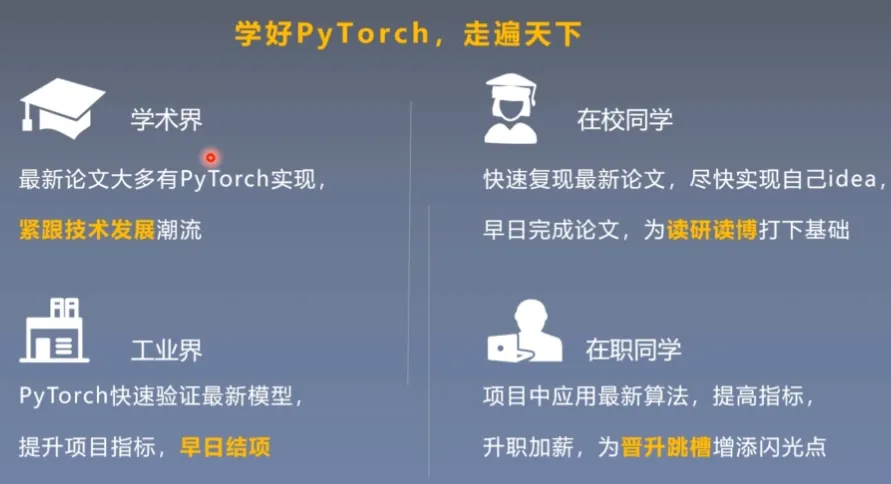
Pytorch学习哪些知识
Pytorch定位:深度学习框架,实现深度学习模型算法
人工智能:多领域交叉科学技术
机器学习:计算机智能决策算法
深度学习:高效的机器学习算法
Pytorch实现模型训练
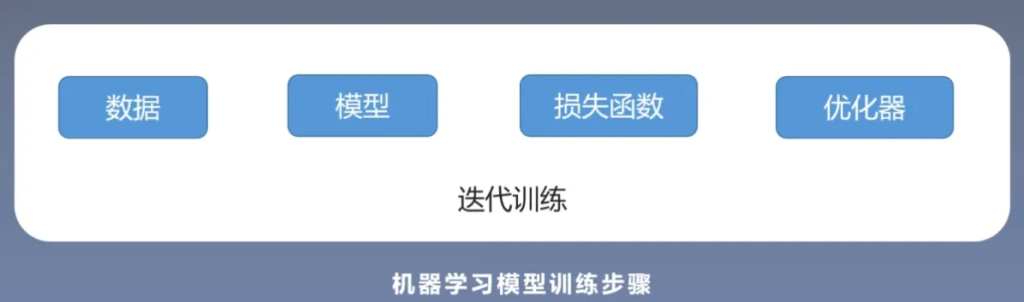
模型训练过程中细分的过程:
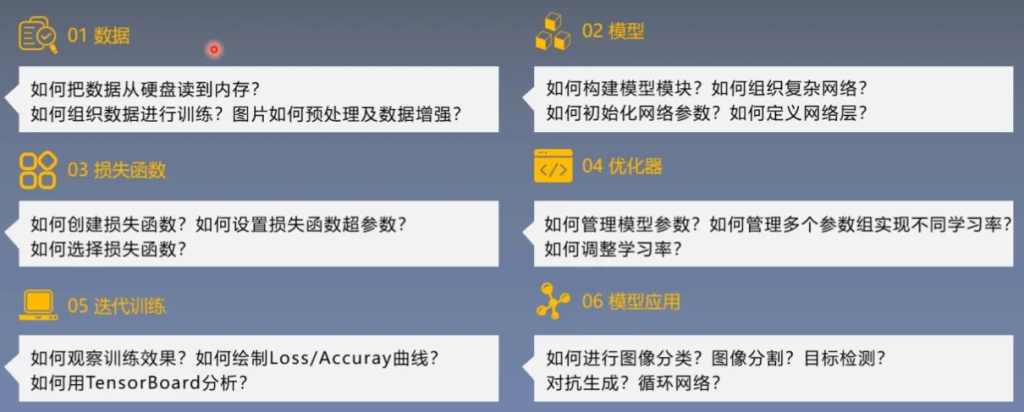
如何学习和掌握Pytorch
学习Pytorch的困境
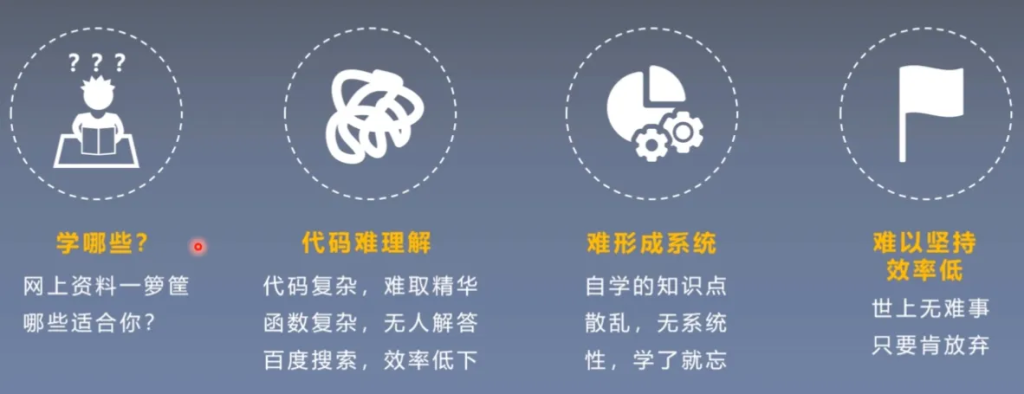
跟课、多思考、多实践、多问大模型、多总结

Pytorch学习路径
整个课程大致的学习内容
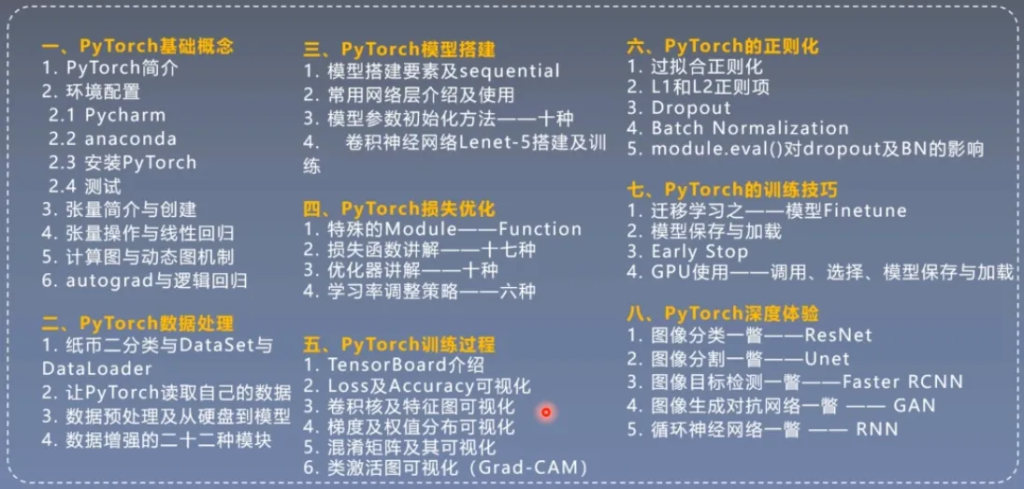
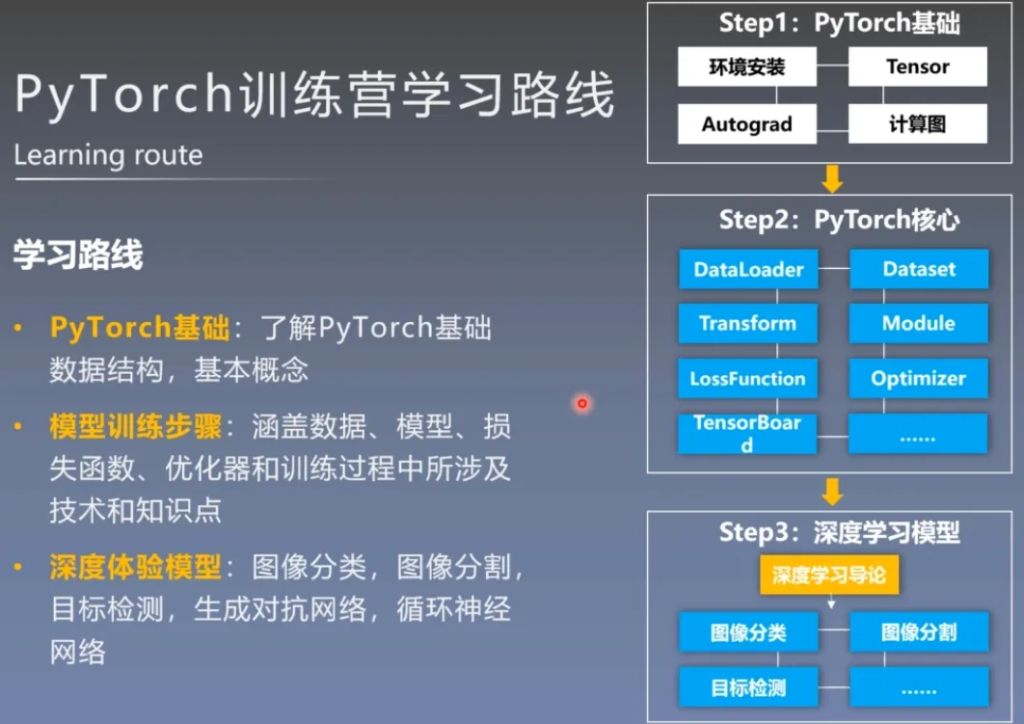
Pytorch学习路线
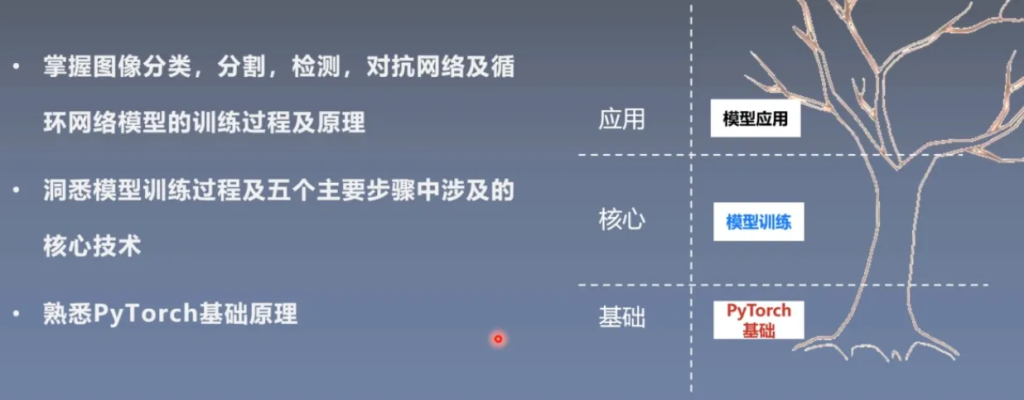
最终能达到的目标
Pytorch简介与安装
Pytorch简介
简而言之,Pytorch是在Torch基础上用python语言重新打造的深度学习框架。

Pytorch发展迅速,在深度学习领域占比增长速度很快。
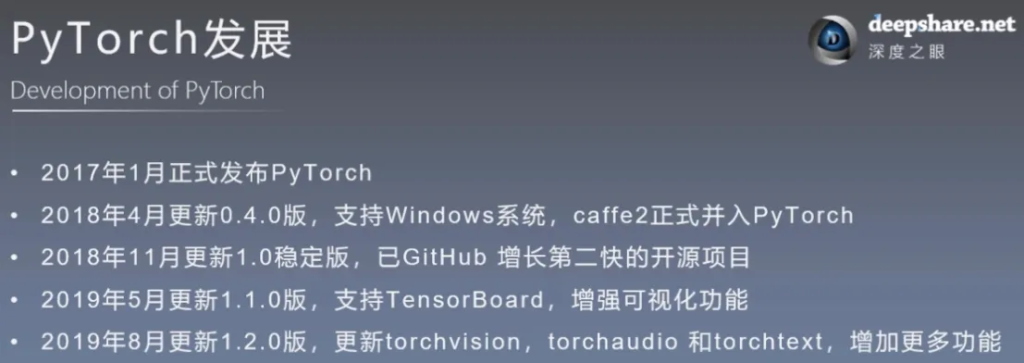
这些在上面已经说明了很多,这里不多赘述了。
软件安装(环境配置与搭建)
解释器与工具包
解释器:将python语言翻译成机器指令语言的程序
工具包:又称之为依赖包、模块、库、包等
- python之所以强大是因为拥有大量工具包
- 内置包:os、sys、glob、re、math等
- 第三方包:pytorch、TensorFlow、numpy等
虚拟环境
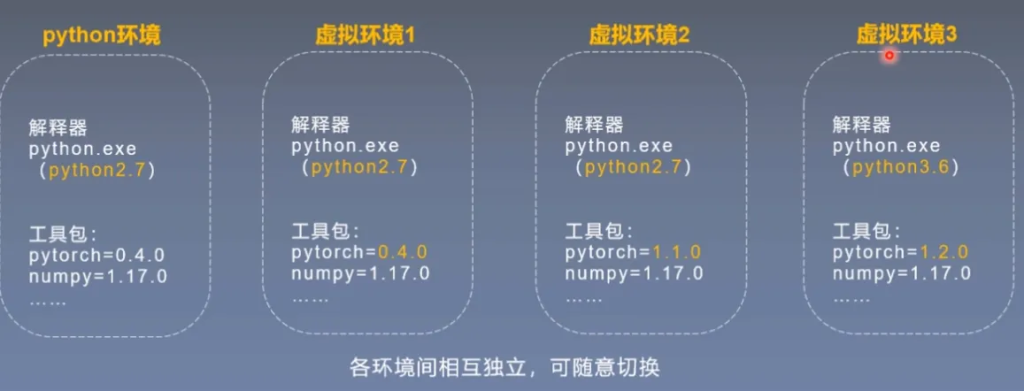
在python开发环境中,有python解释器与工具包。
在不同项目中,采用的解释器版本与工具包版本可能不同。
所以我们为项目创建虚拟环境来满足需求,各环境间相互独立,可以随意切换
Anaconda
Anaconda是为方便使用python而建立的一个软件包,其包含了常用的250多个工具包,多版本python解释器和强大的虚拟环境管理工具。
Anaconda可以使安装、运行和升级环境变得简单,因此推荐使用。
安装步骤:
- Https://www.anaconda.com/distribution/#download-section官网下载安装包
- 运行Anaconda3-2019.07-Windows-x86 64.exe
- 选择路径,勾选将Add Anaconda to the system PATH environment variable,等待安装完成
- 验证安装成功,打开命令、输入Conda、回车
- 添加中科大镜像
Pycharm(可以使用VScode)
Pycharm是一款python的IDE,总之功能强大就对了。
安装步骤:
- 官网下载安装包https://www.jetbrains.com/pycharm/
- 运行pycharm-professional-2019.2.exe
- 选择路径,勾选Add launchers dir to the PATH,等待安装完成
Pytorch
安装步骤:
- 检查是否有合适GPU,若有,需安装CUDA与CuDNN
- CUDA与CuDNN安装(非必须)
- 下载whl文件,登陆https://download.pytorch.org/whl/torch_stable.html,下载pytorch与torchvision的whl文件,进入相应虚拟环境,通过pip安装
- 在pycharm中创建hellopytorch项目,运行脚本,查看pytorch版本
命名解释:
cu92/torch-1.2.0%2Bcu92-cp37-cp37m-win_amd64.whl
Anaconda创建虚拟环境
需要新建一个环境可以起名叫做DL(其他也行)
conda create -n DL python=3.8
conda env list
conda activate DL
conda install jupyter
pip insatll scikit-learn
以上全部可以看CSDN上详细的步骤:
【超详细教程】2024最新Pytorch安装教程(同时讲解安装CPU和GPU版本)-CSDN博客
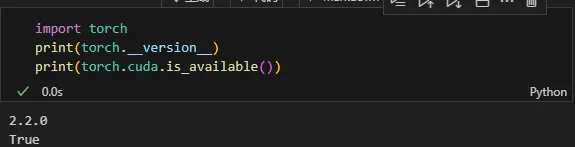
程序输出一下
Pytorch的Tensor(张量)
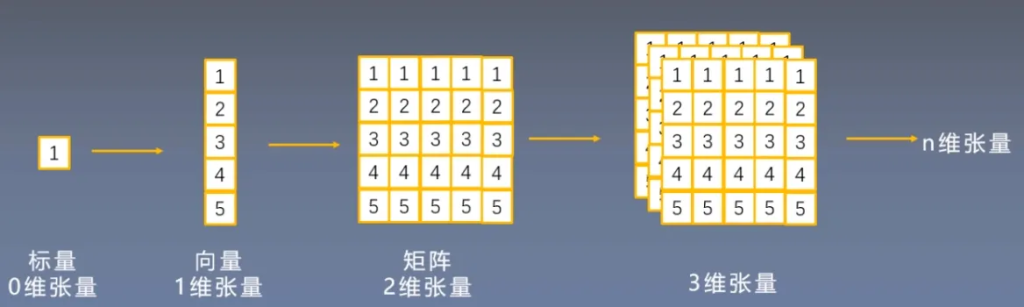
张量是什么?
张量在数学概念中是一个多维数组,它是标量、向量、矩阵的高维拓展
Tensor与Variable
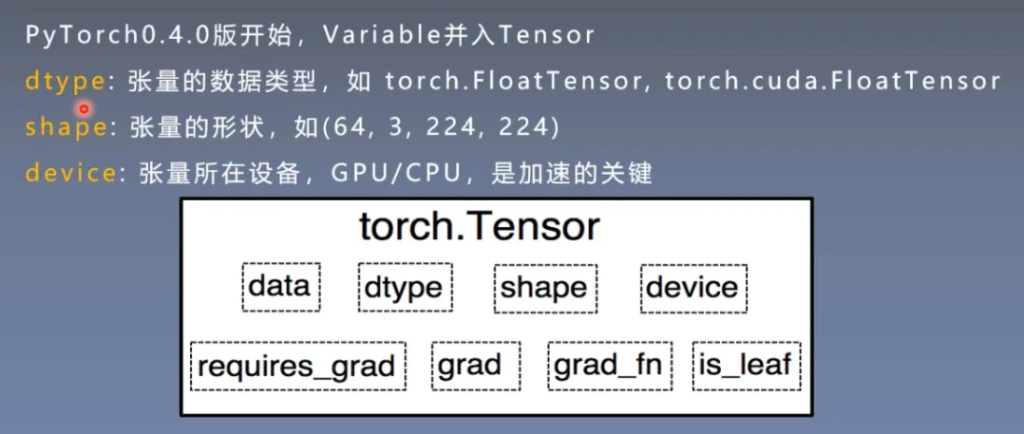
variable主要是给Tensor增加了四个属性,这四个属性用于自动求导
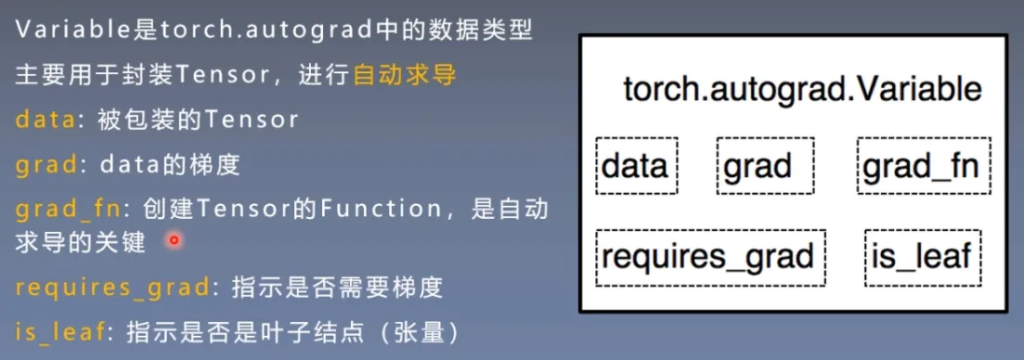
Tensor
下方的四个在Variable中介绍过了,与求导相关的。
张量的创建
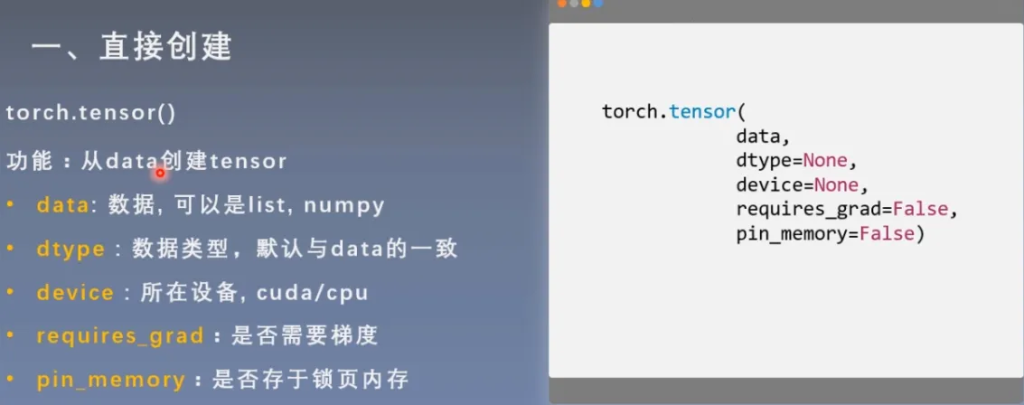
1 直接创建
从data创建tensor
import numpy as np
import torch
arr = np.ones((3,3))
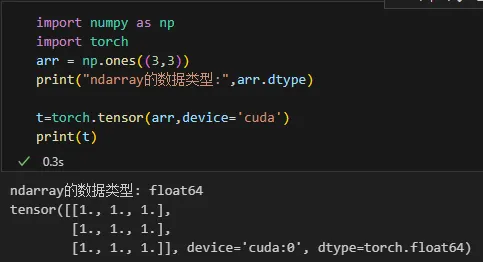
print("ndarray的数据类型:",arr.dtype)

t=torch.tensor(arr,device='cuda')
print(t)
结果:
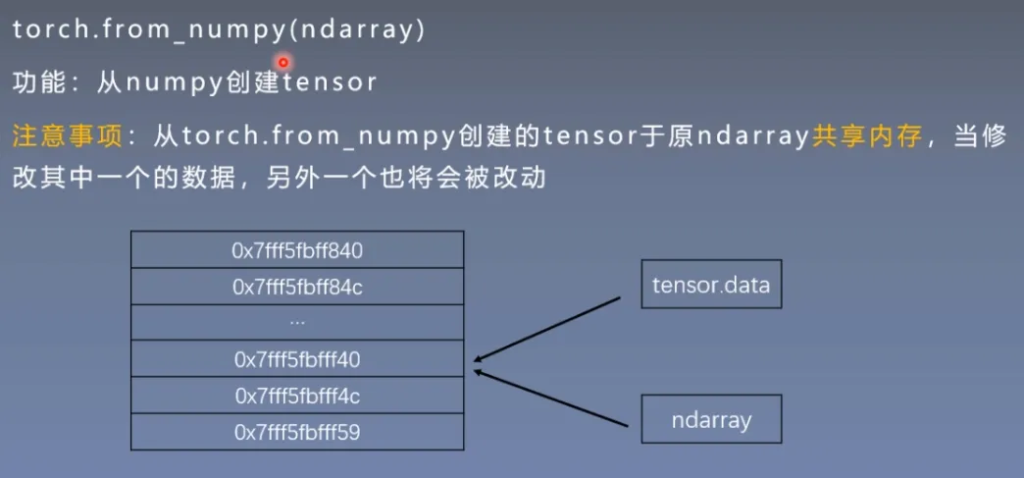
从numpy创建tensor
注意:通过这样方式创建的tensor与原ndarray共享内存
import numpy as np
import torch
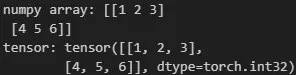
arr = np.array([[1,2,3],[4,5,6]])

t=torch.from_numpy(arr)
print("numpy array:",arr)
print("tensor:",t)
结果:
2 依据数值创建
依据数值创建全0张量
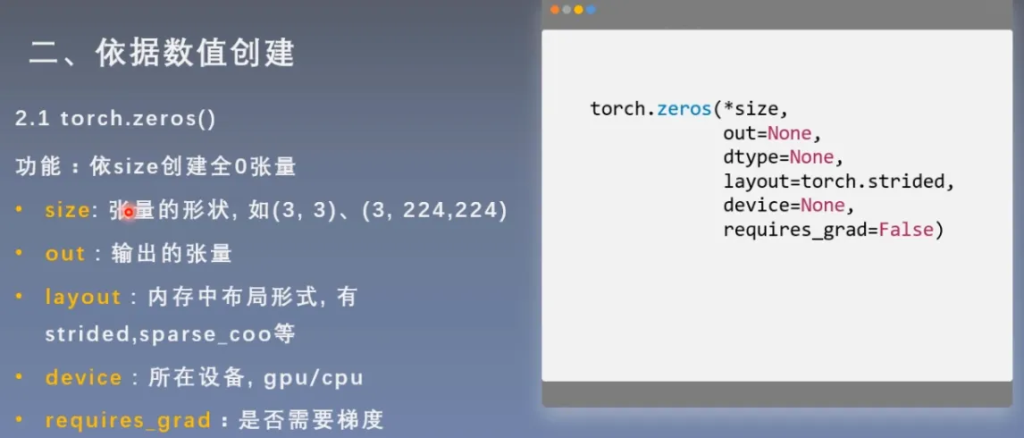
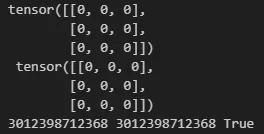
由代码我们可以得知,我们创建的t赋值给了out_t
import torch

out_t = torch.tensor([1])

t = torch.zeros((3,3),out=out_t)

print(t,'\n',out_t)
print(id(t,),id(out_t),id(t)==id(out_t))
结果:
依据数值创建全1张量
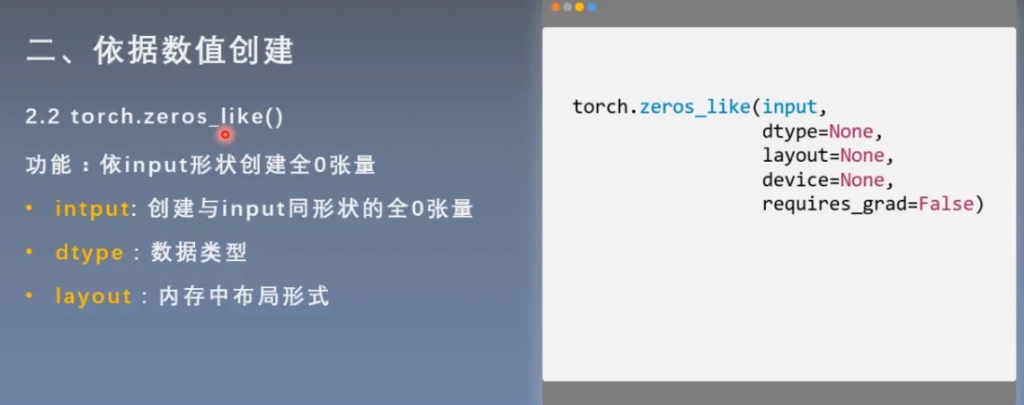
这里ones与上面是类似的
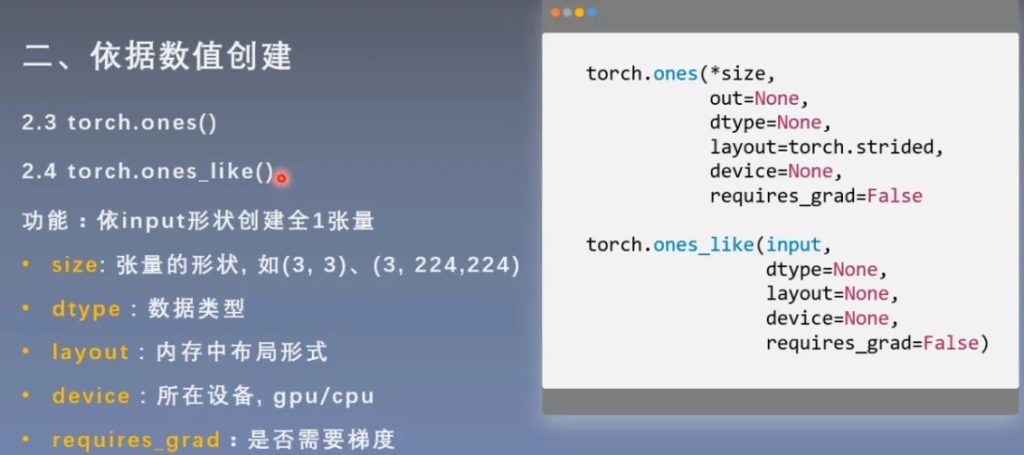
pytorch还给我们提供了填充任意值的函数
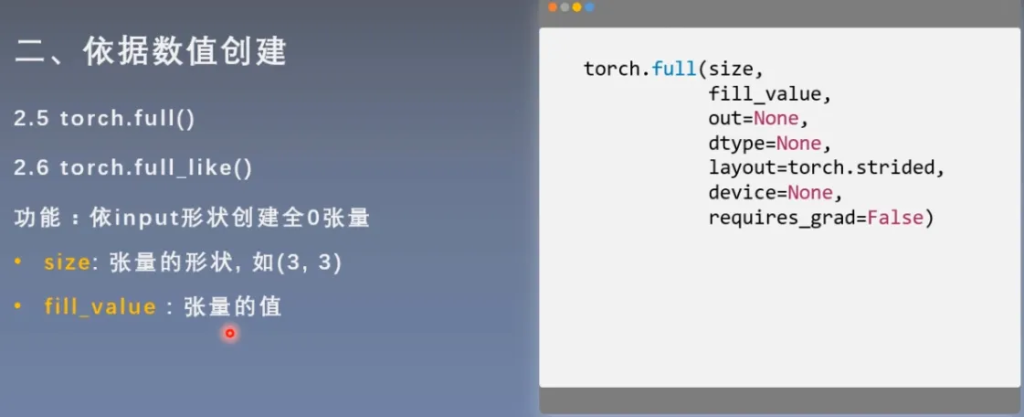
import torch

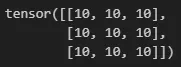
t = torch.full((3,3),10)
print(t)
结果:
创建等差数列的张量
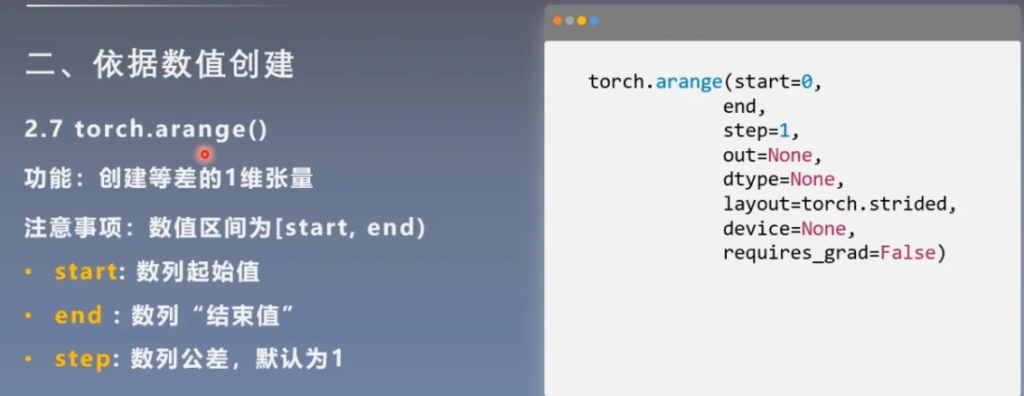
import torch

t = torch.arange(2,10,2)
print(t)
结果:

创建均分数列的张量
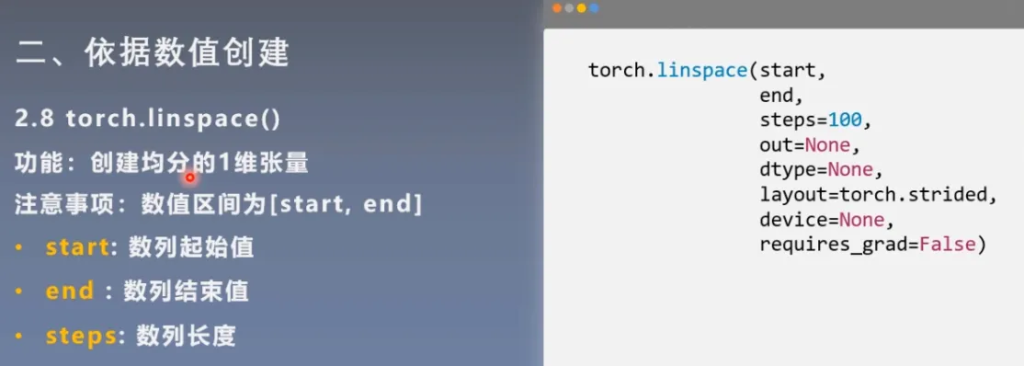
import torch

t = torch.linspace(2,10,5)
print(t)
结果:

创建对数均分的张量
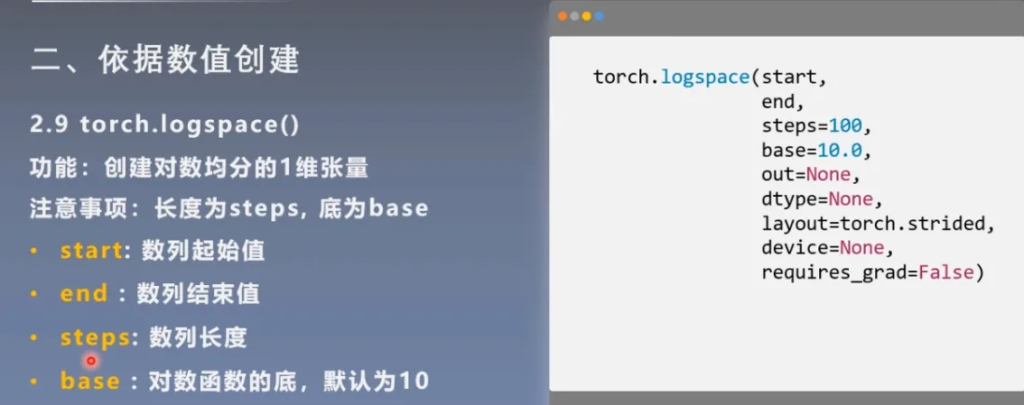
创建单位对角矩阵张量
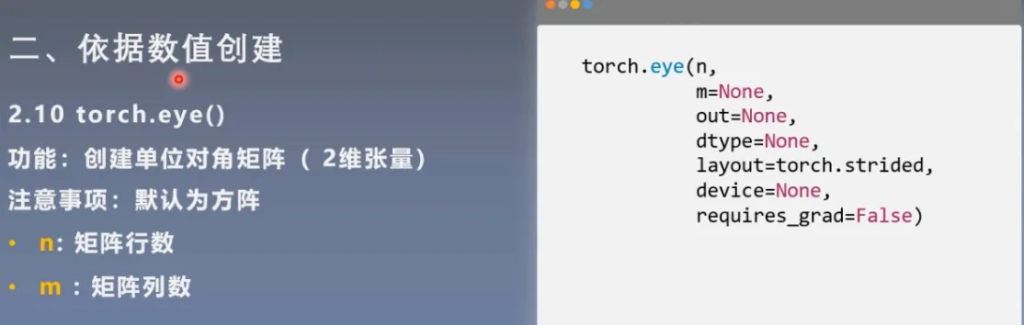
3 依据概率分布创建张量
正态分布
也称为高斯分布
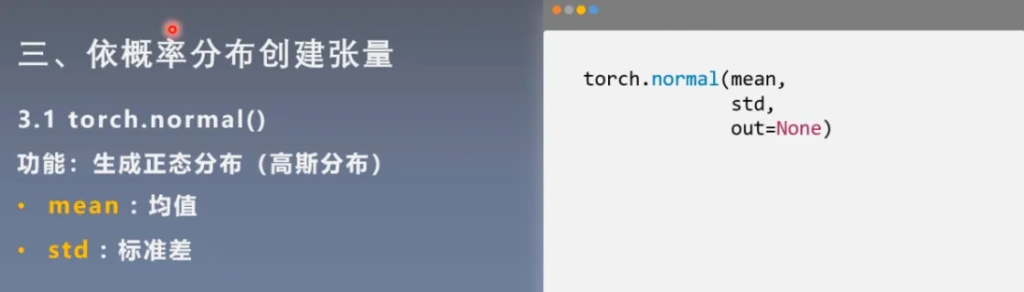
四种模式:
- mean为标量,std为标量
- mean为标量,std为张量
- mean为张量,std为标量
- mean为张量,std为张量
import torch
#mean:张量 std:张量
# mean = torch.arange(1,5,dtype=torch.float)
# std = torch.arange(1,5,dtype=torch.float)
# t_normal = torch.normal(mean,std)
# print("mean:{}\nstd:{}".format(mean,std))
# print(t_normal)

#mean:标量 std:标量
# t_normal = torch.normal(0., 1., size=(4,))
# print(t_normal)

#mean:张量 std:标量
# mean = torch.arange(1,5,dtype=torch.float)
# std = 1
# t_normal = torch.normal(mean,std)
# print("mean:{}\nstd:{}".format(mean,std))
# print(t_normal)
标准正态分布
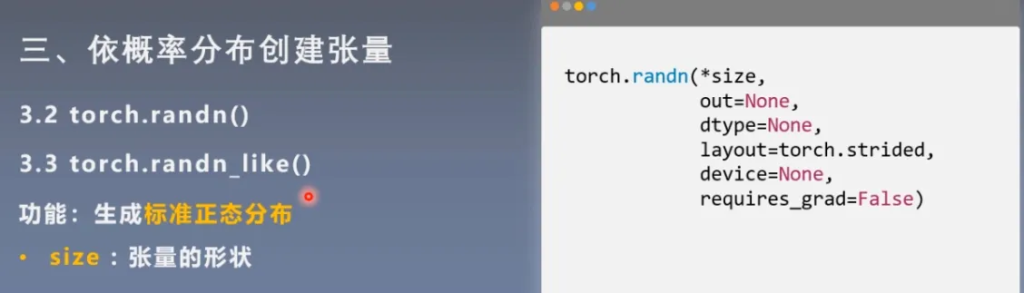
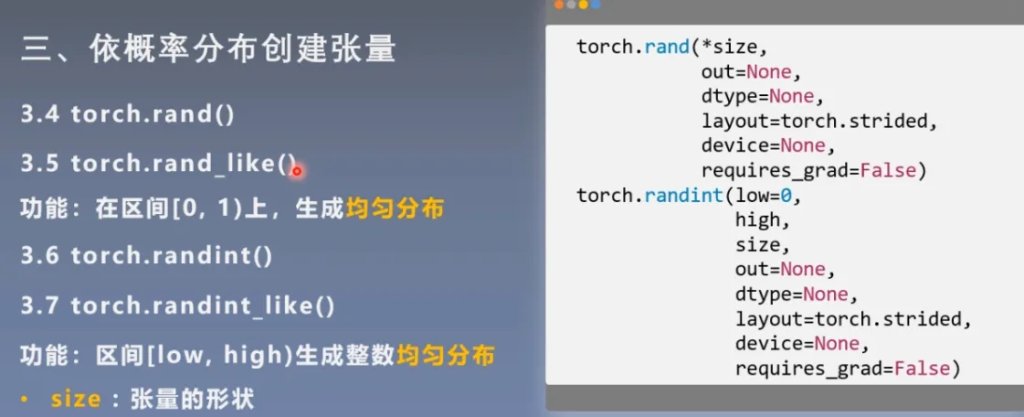
均匀分布
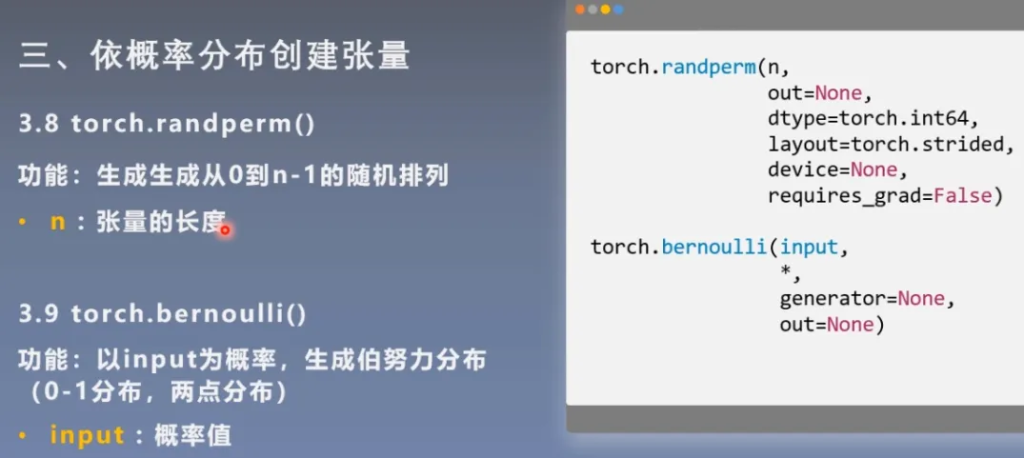
随机排列和概率值
张量的操作与线性回归
张量的操作
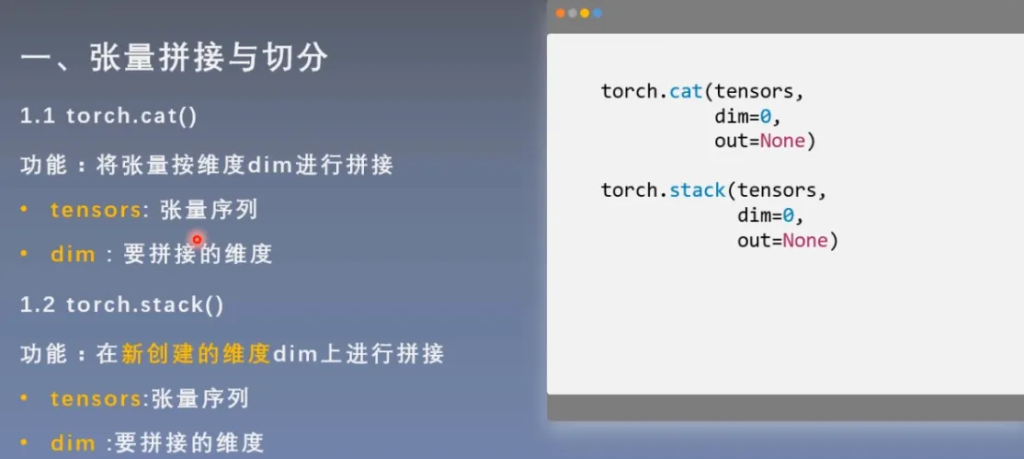
拼接
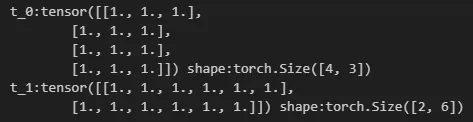
import torch

t = torch.ones((2,3))

t_0 = torch.cat([t,t],dim=0)
t_1 = torch.cat([t,t],dim=1)

print("t_0:{} shape:{}".format(t_0,t_0.shape))
print("t_1:{} shape:{}".format(t_1,t_1.shape))
结果:
import torch
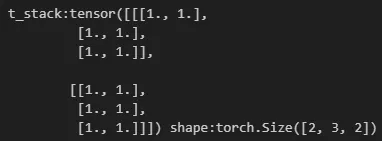
t=torch.ones((2,3))
t_stack=torch.stack([t,t],dim=2)
print("t_stack:{} shape:{}".format(t_stack,t_stack.shape))
结果:
切分
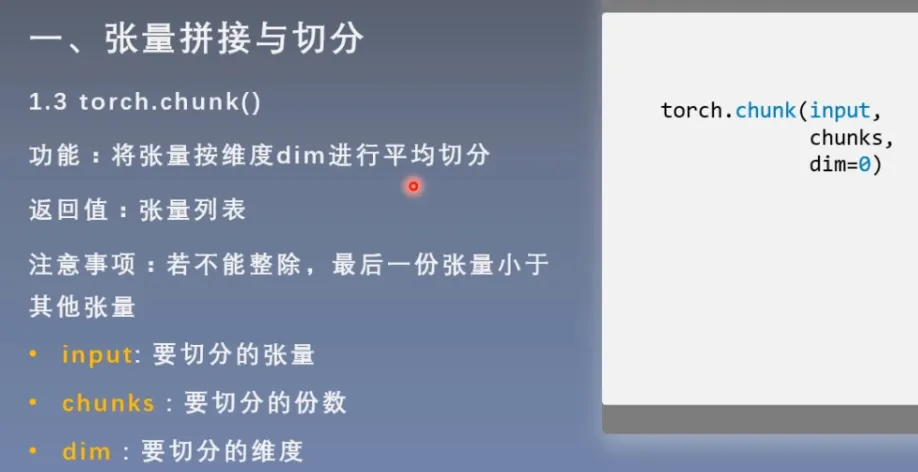
平均切分
import torch

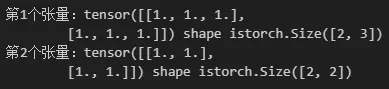
a = torch.ones((2,5))
list_of_tensors = torch.chunk(a,dim=1,chunks=2)

for idx,t in enumerate(list_of_tensors):
    print("第{}个张量:{} shape is{}".format(idx+1,t,t.shape))
结果:
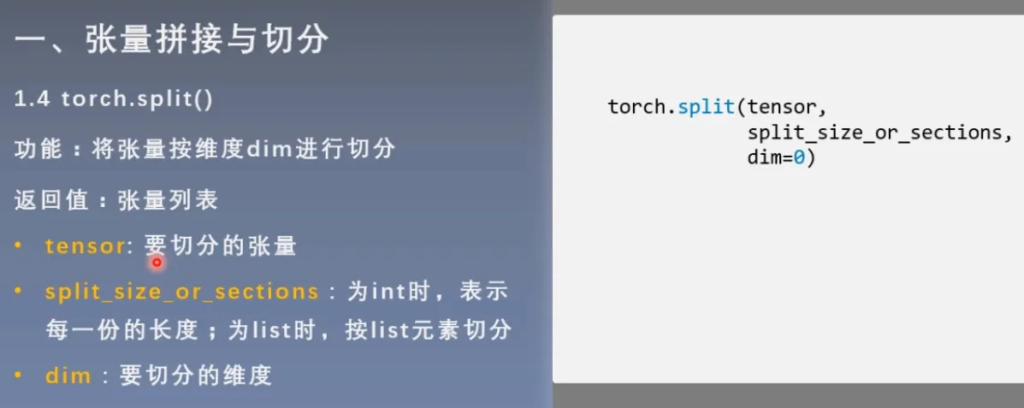
可以指定切分长度
import torch
t=torch.ones((2,5))
t=torch.ones((2,5))

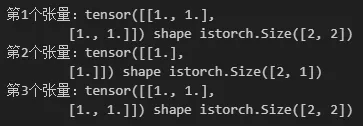
list_of_tensors = torch.split(t,[2,1,2],dim=1)

for idx,t in enumerate(list_of_tensors):
    print("第{}个张量:{} shape is{}".format(idx+1,t,t.shape))
结果:
索引
import torch

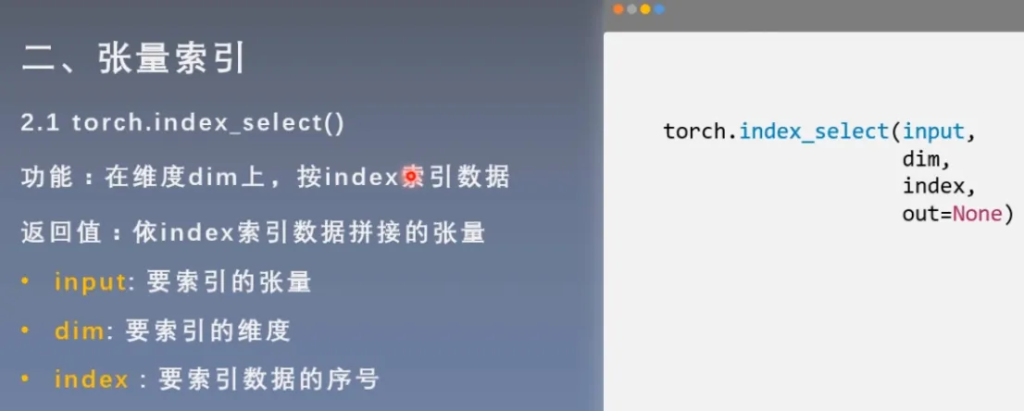
t = torch.randint(0,9,size=(3,3))
idx = torch.tensor([0,2],dtype=torch.long)
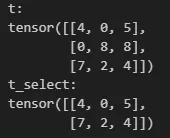
t_select = torch.index_select(t,dim=0,index=idx)
print("t:\n{}\nt_select:\n{}".format(t,t_select))
结果:
import torch

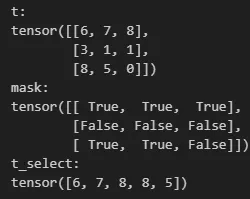
t = torch.randint(0,9,size=(3,3))
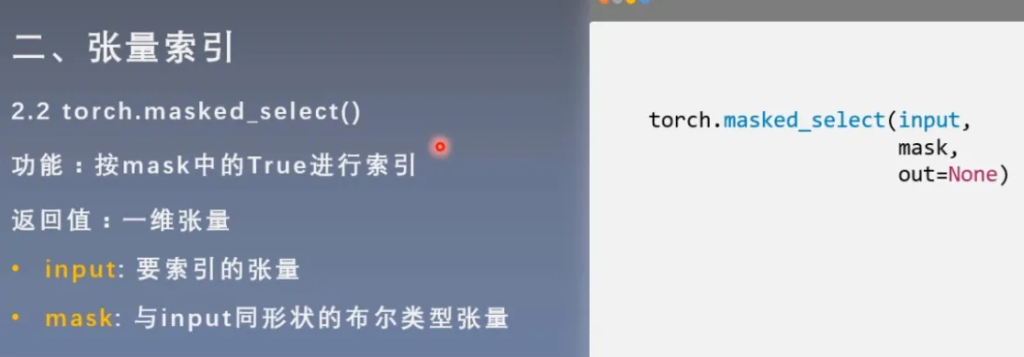
mask = t.ge(5) #大于等于5的元素为True
t_select = torch.masked_select(t,mask)

print("t:\n{}\nmask:\n{}\nt_select:\n{}".format(t,mask,t_select))
结果:
变换
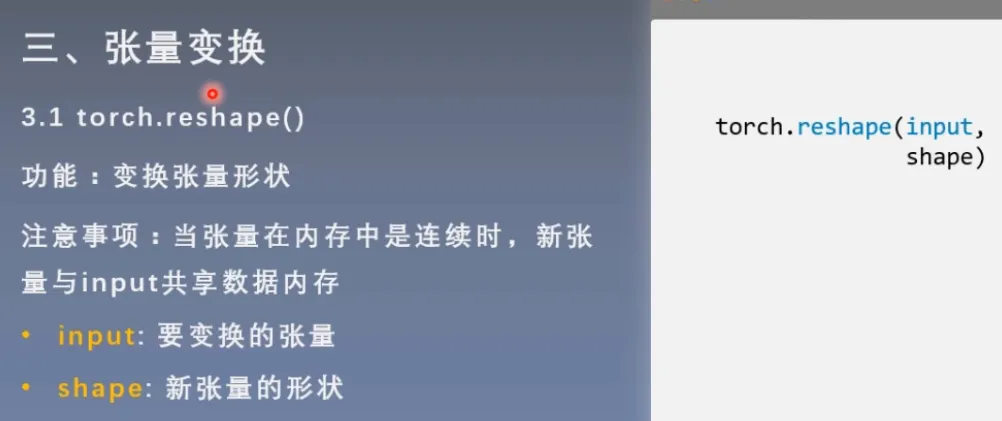
import torch

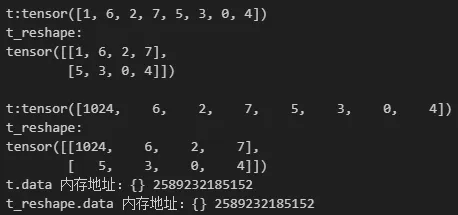
t=torch.randperm(8)
t_reshape = torch.reshape(t,(2,4))
print("t:{}\nt_reshape:\n{}".format(t,t_reshape))

t[0]=1024
print("\nt:{}\nt_reshape:\n{}".format(t,t_reshape))
print("t.data 内存地址:{}",format(id(t.data)))
print("t_reshape.data 内存地址:{}",format(id(t_reshape.data)))
结果:
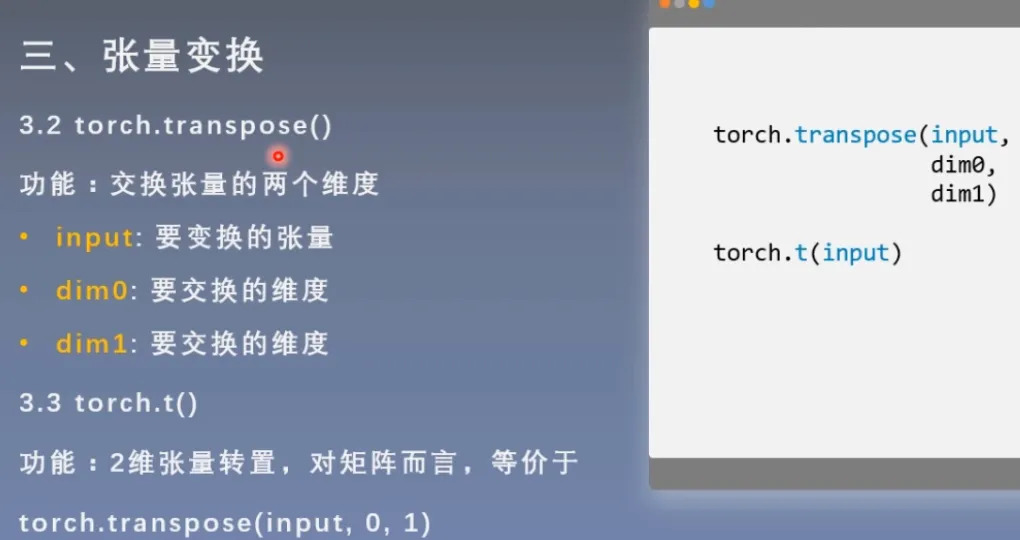
import torch
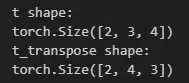
t = torch.rand((2,3,4))
t_transpose = torch.transpose(t,1,2)

print("t shape:\n{}\nt_transpose shape:\n{}".format(t.shape,t_transpose.shape))
结果:
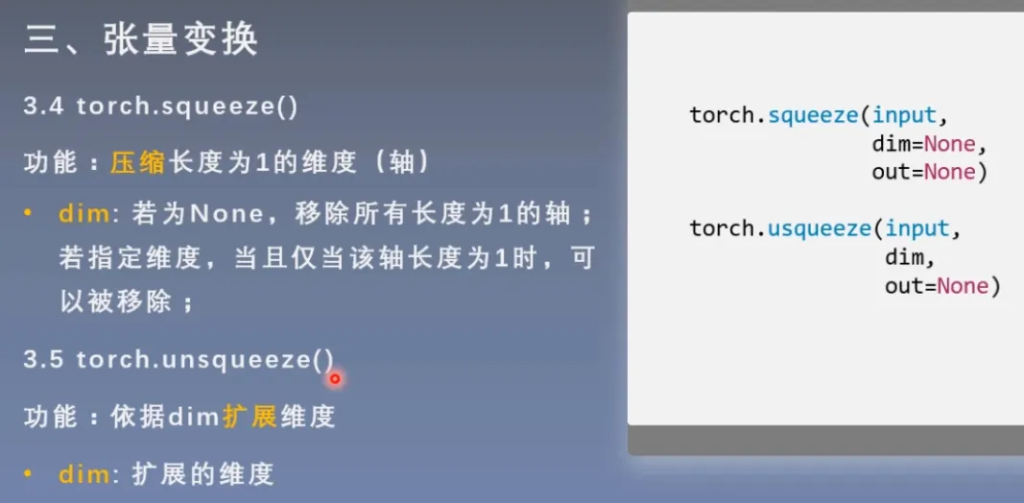
import torch
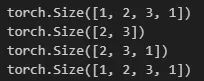
t = torch.rand((1,2,3,1))

t_sq = torch.squeeze(t)
t_0 = torch.squeeze(t,0)
t_1 = torch.squeeze(t,1)

print(t.shape)
print(t_sq.shape)
print(t_0.shape)
print(t_1.shape)
结果:
张量的数学运算
简单介绍一下有哪些运算,用到的时候随时查就可以了。
加减乘除
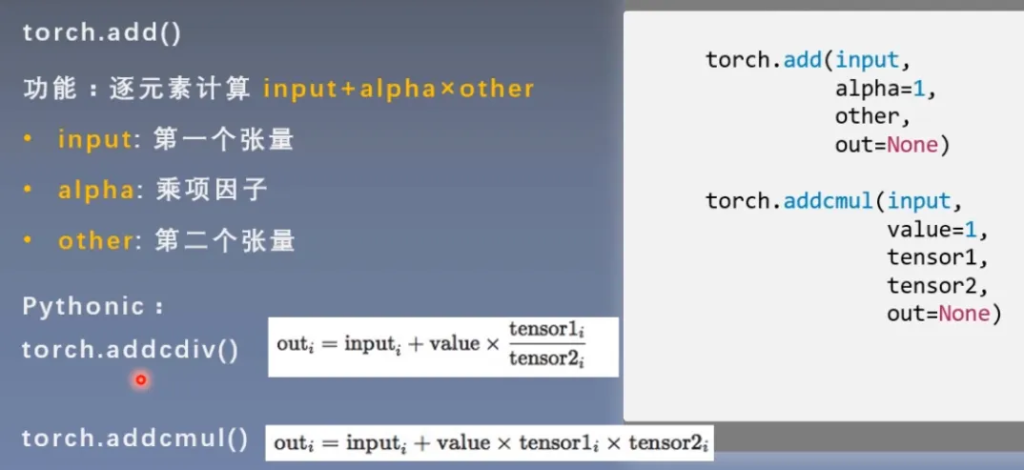
torch.add()
torch.addcdiv()
torch.addcmul()
torch.sub()
torch.div()
torch.mul()
由于我们经常用到 乘项因子x张量+张量,所以为了简洁代码,在add中内置了这样的计算。
import torch

t_0 = torch.randn((3,3))
t_1 = torch.ones_like(t_0)
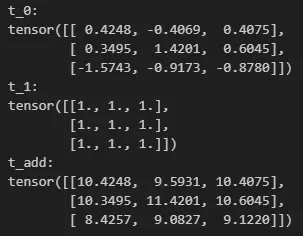
t_add = torch.add(t_0, 10, t_1)

print("t_0:\n{}\nt_1:\n{}\nt_add:\n{}".format(t_0,t_1,t_add))
结果:
对数,指数,幂函数
torch.log(input, out=None)
torch.log10(input, out=None)
torch.log2(input, out=None)
torch.exp(input, out=None)
torch.pow()
三角函数
torch.abs(input, out=None)
torch.acos(input, out=None)
torch.cosh(input, out=None)
torch.cos(input, out=None)
torch.asin(input, out=None)
torch.atan(input, out=None)
torch.atan2(input, other, out=None)
线性回归
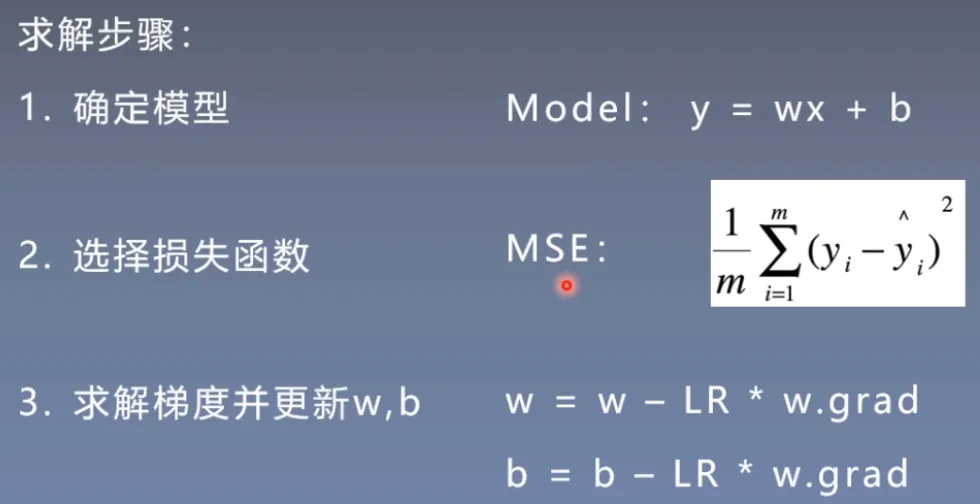
线性回归是分析一个变量与另一(多)个变量之间关系的方法
因变量:y 自变量:x 关系:线性
y = wx + b
分析:求解w,b
以下是代码实现:
import torch
import matplotlib.pyplot as plt
torch.manual_seed(10)

lr = 0.05  # 学习率    20191015修改

# 创建训练数据
x = torch.rand(20, 1) * 10  # x data (tensor), shape=(20, 1)
y = 2*x + (5 + torch.randn(20, 1))  # y data (tensor), shape=(20, 1)

# 构建线性回归参数
w = torch.randn((1), requires_grad=True)
b = torch.zeros((1), requires_grad=True)

for iteration in range(1000):

    # 前向传播
    wx = torch.mul(w, x)
    y_pred = torch.add(wx, b)

    # 计算 MSE loss
    loss = (0.5 * (y - y_pred) ** 2).mean()

    # 反向传播
    loss.backward()

    # 更新参数
    b.data.sub_(lr * b.grad)
    w.data.sub_(lr * w.grad)

    # 清零张量的梯度
    w.grad.zero_()
    b.grad.zero_()

    # 绘图
    if iteration % 20 == 0:

        plt.scatter(x.data.numpy(), y.data.numpy())
        plt.plot(x.data.numpy(), y_pred.data.numpy(), 'r-', lw=5)
        plt.text(2, 20, 'Loss=%.4f' % loss.data.numpy(), fontdict={'size': 20, 'color':  'red'})
        plt.xlim(1.5, 10)
        plt.ylim(8, 28)
        plt.title("Iteration: {}\nw: {} b: {}".format(iteration, w.data.numpy(), b.data.numpy()))
        plt.pause(0.5)

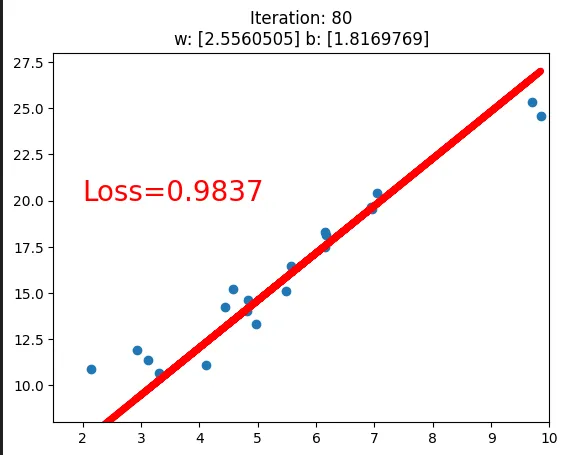
        if loss.data.numpy() < 1:
            break
结果:在迭代80次后loss降到了1以下
这部分还不是很懂,回头补充一下。
计算图与动态图机制
计算图
计算图是用来描述运算的有向无环图
计算图有两个主要元素:结点(Node) 边(Edge)
结点表示数据,如向量、矩阵、张量
边表示运算,如加减乘除卷积等
用计算图表示:y = (x + w) * (w + 1)
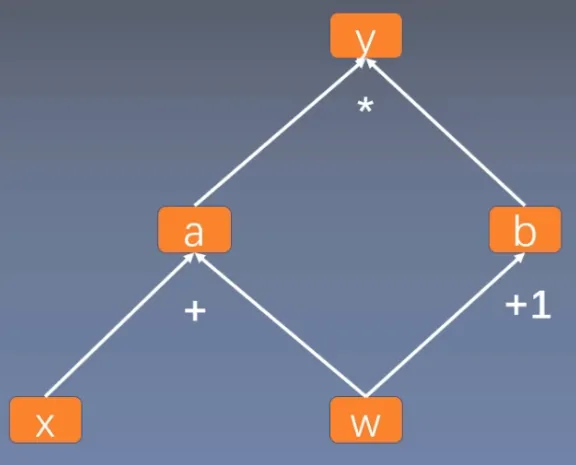
使用计算图不仅仅可以让计算变得简洁,更重要的作用是使得梯度求导变得更加方便
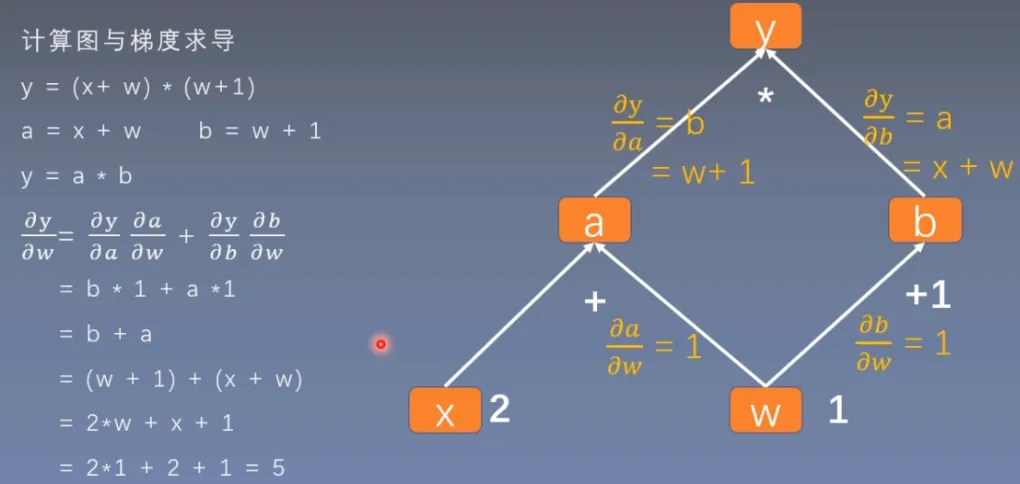
用代码来验证一下:
import torch

w = torch.tensor([1.], requires_grad=True)
x = torch.tensor([2.], requires_grad=True)

a = torch.add(w, x)     # retain_grad()
b = torch.add(w, 1)
y = torch.mul(a, b)

y.backward()
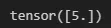
print(w.grad)
结果:
is_leaf
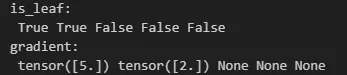
在之前学习张量时,Tensor中有is_leaf的变量,用来指示张量是否为叶子结点。
同时非叶子结点在反向传播后,其梯度会被释放掉。
如果想要保留非叶子结点的梯度,需要加上retain_grad( )
# 查看叶子结点
print("is_leaf:\n", w.is_leaf, x.is_leaf, a.is_leaf, b.is_leaf, y.is_leaf)

# 查看梯度
print("gradient:\n", w.grad, x.grad, a.grad, b.grad, y.grad)
结果:
grad_fn
用来记录创建该张量时所用的方法(函数),用来在反向传播时计算梯度。
y.grad_fn =<MulBackward0>
a.grad_fn =<AddBackward0>
b.grad_fn =<AddBackward0>
# 查看 grad_fn
print("grad_fn:\n", w.grad_fn, x.grad_fn, a.grad_fn, b.grad_fn, y.grad_fn)
结果:

动态图
根据计算图搭建方式,可将计算图分为动态图和静态图
动态图:运算与搭建同时进行(Pytorch)
静态图:先搭建图,后运算(TensorFlow)
Pytorch是在每一步计算的同时搭建图
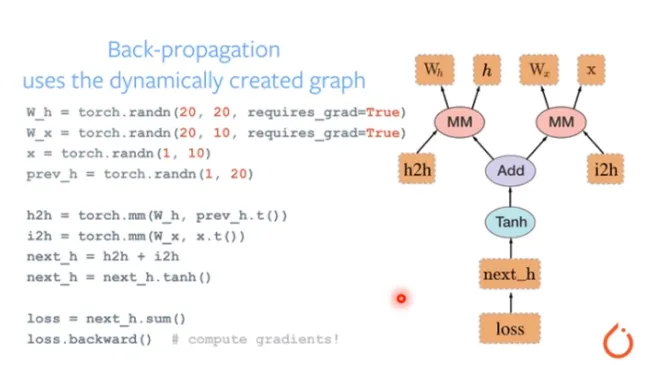
而Tensorflow是先搭建好所有的图,再传入数据进行计算
Autograd与逻辑回顾
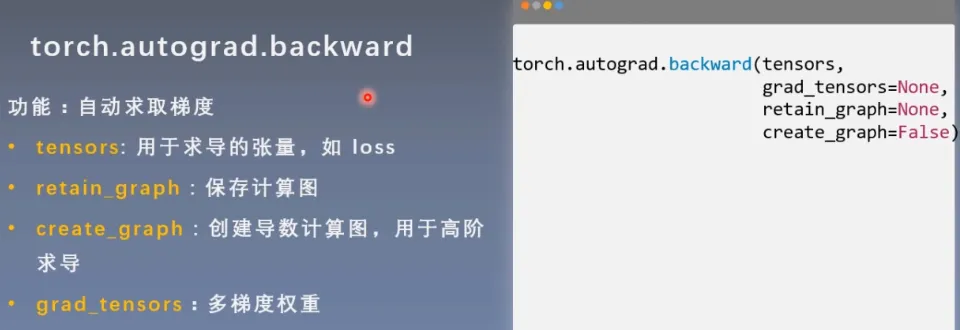
torch.autograd—自动求导系统
backward
grad
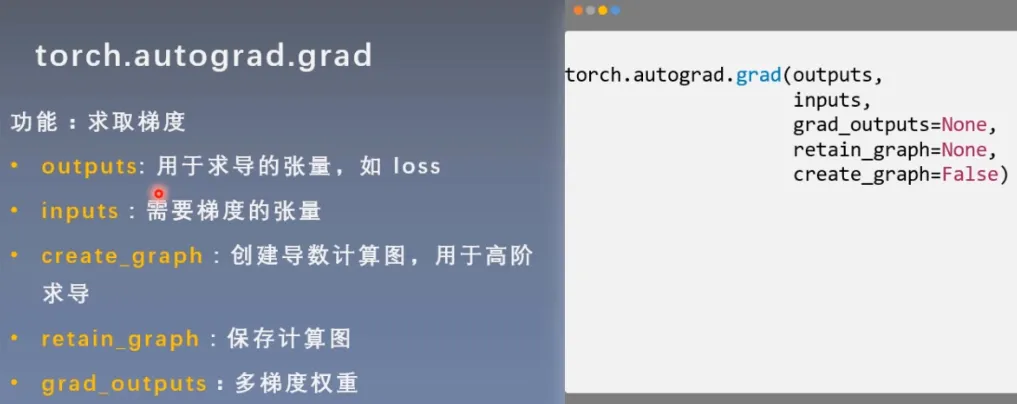
import torch

x = torch.tensor([3.],requires_grad=True)
y = torch.pow(x,2)

#创建图,为了计算二阶导数
grad_1 = torch.autograd.grad(y,x,create_graph=True)
print("grad_1:",grad_1)

grad_2 = torch.autograd.grad(grad_1[0],x)
print("grad_2:",grad_2)
结果:

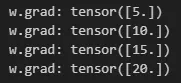
autograd小贴士:
- 梯度不自动清零
import torch

w = torch.tensor([1.], requires_grad=True)
x = torch.tensor([2.], requires_grad=True)

for i in range(4):
    a = torch.add(w, x)     # retain_grad()
    b = torch.add(w, 1)
    y = torch.mul(a, b)

    y.backward()

    print("w.grad:", w.grad)

    #w.grad.zero_()
结果:
- 依赖于叶子结点的结点,requires_grad默认为True
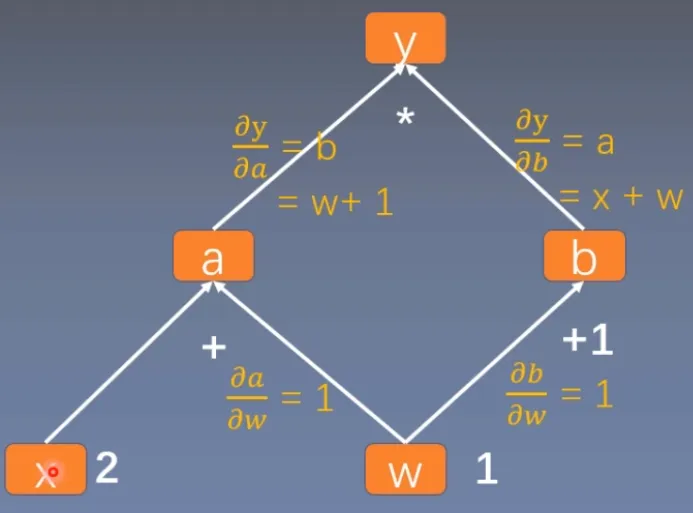
可以用这张图来理解,a的梯度依赖于x的梯度,所以其requires_grad默认为True
import torch

w = torch.tensor([1.], requires_grad=True)
x = torch.tensor([2.], requires_grad=True)

a = torch.add(w, x)     # retain_grad()
b = torch.add(w, 1)
y = torch.mul(a, b)


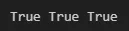
print(a.requires_grad,b.requires_grad,y.requires_grad)
结果:
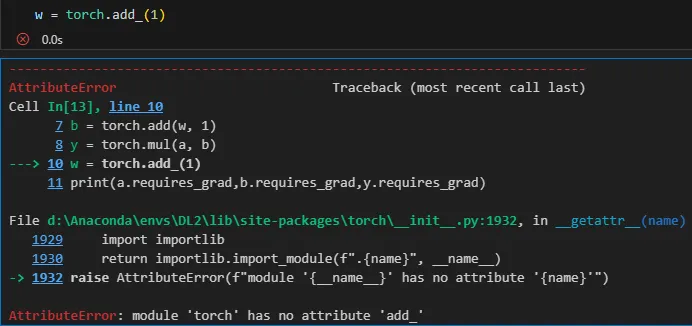
- 叶子结点不可执行in-place(原地操作)
在前向传播过程中,会记录叶子结点的地址;在反向传播过程中,根据地址去寻找叶子结点的值,如果这个时候叶子结点原地操作导致值的改变,就与前向传播过程中的值不同,这就会产生错误。
import torch

w = torch.tensor([1.], requires_grad=True)
x = torch.tensor([2.], requires_grad=True)

a = torch.add(w, x)     # retain_grad()
b = torch.add(w, 1)
y = torch.mul(a, b)

w = torch.add_(1)
结果:
逻辑回归
什么是逻辑回归模型?
逻辑回归模型是线性的二分类模型
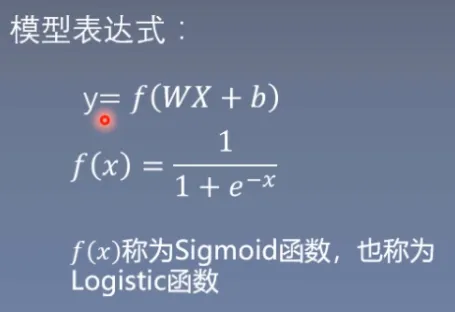
sigmoid函数:将输入的数据映射到0到1之间
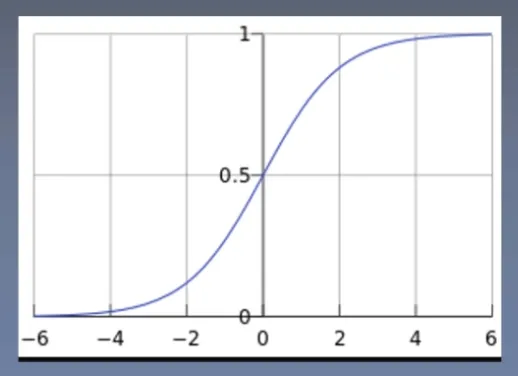
二分类:设置一个阈值为0.5,当y<0.5为0,当y>=0.5为1
线性:
逻辑回归模型相当于在线性回归模型的基础上增加了一个激活函数
即便没有这个激活函数,线性回归模型也可以做二分类问题,等价于y>0则为1,y<0为0
但是为了更好的描述分类自信度,我们将值映射到01之间,符合概率取值
逻辑回归也可以叫 对数几率回归
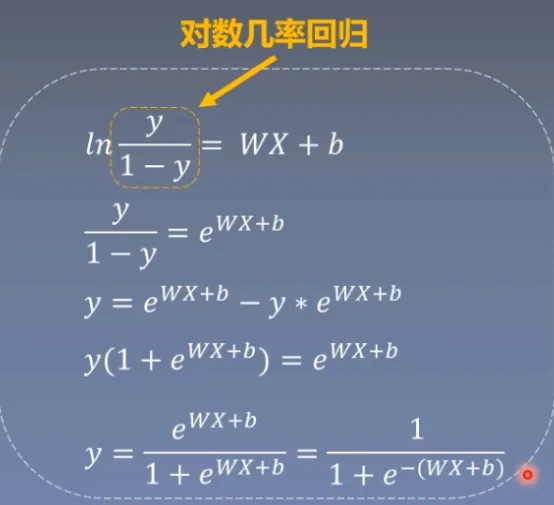
模型训练过程
import torch
import torch.nn as nn
import torch.optim as optim
import matplotlib.pyplot as plt
import numpy as np
torch.manual_seed(10)

# ============================ step 1/5 生成数据 ============================
sample_nums = 100
mean_value = 1.7
bias = 1
n_data = torch.ones(sample_nums, 2)
x0 = torch.normal(mean_value * n_data, 1) + bias      # 类别0 数据 shape=(100, 2)
y0 = torch.zeros(sample_nums)                         # 类别0 标签 shape=(100, 1)
x1 = torch.normal(-mean_value * n_data, 1) + bias     # 类别1 数据 shape=(100, 2)
y1 = torch.ones(sample_nums)                          # 类别1 标签 shape=(100, 1)
train_x = torch.cat((x0, x1), 0)
train_y = torch.cat((y0, y1), 0)
# ============================ step 2/5 选择模型 ============================
#定义模型的类
class LR(nn.Module):
    def __init__(self):
        super(LR, self).__init__()
        self.features = nn.Linear(2, 1)
        self.sigmoid = nn.Sigmoid()

#定义好前向传播
    def forward(self, x):
        x = self.features(x)
        x = self.sigmoid(x)
        return x

lr_net = LR()   # 实例化逻辑回归模型

# ============================ step 3/5 选择损失函数 ============================
loss_fn = nn.BCELoss()

# ============================ step 4/5 选择优化器   ============================
lr = 0.01  # 学习率
optimizer = optim.SGD(lr_net.parameters(), lr=lr,momentum=0.9)  # 随机梯度下降优化器

# ============================ step 5/5 模型训练 ============================
for iteration in range(1000):

    # 前向传播
    y_pred = lr_net(train_x)

    # 计算 loss
    loss = loss_fn(y_pred.squeeze(), train_y)

    # 反向传播
    loss.backward()

    # 更新参数
    optimizer.step()

    # 清空梯度
    optimizer.zero_grad()

    # 绘图
    if iteration % 20 == 0:

        mask = y_pred.ge(0.5).float().squeeze()  # 以0.5为阈值进行分类
        correct = (mask == train_y).sum()  # 计算正确预测的样本个数
        acc = correct.item() / train_y.size(0)  # 计算分类准确率

        plt.scatter(x0.data.numpy()[:, 0], x0.data.numpy()[:, 1], c='r', label='class 0')
        plt.scatter(x1.data.numpy()[:, 0], x1.data.numpy()[:, 1], c='b', label='class 1')

        w0, w1 = lr_net.features.weight[0]
        w0, w1 = float(w0.item()), float(w1.item())
        plot_b = float(lr_net.features.bias[0].item())
        plot_x = np.arange(-6, 6, 0.1)
        plot_y = (-w0 * plot_x - plot_b) / w1

        plt.xlim(-5, 7)
        plt.ylim(-7, 7)
        plt.plot(plot_x, plot_y)

        plt.text(-5, 5, 'Loss=%.4f' % loss.data.numpy(), fontdict={'size': 20, 'color': 'red'})
        plt.title("Iteration: {}\nw0:{:.2f} w1:{:.2f} b: {:.2f} accuracy:{:.2%}".format(iteration, w0, w1, plot_b, acc))
        plt.legend()

        plt.show()
        plt.pause(0.5)

        if acc > 0.99:
            break
结果:
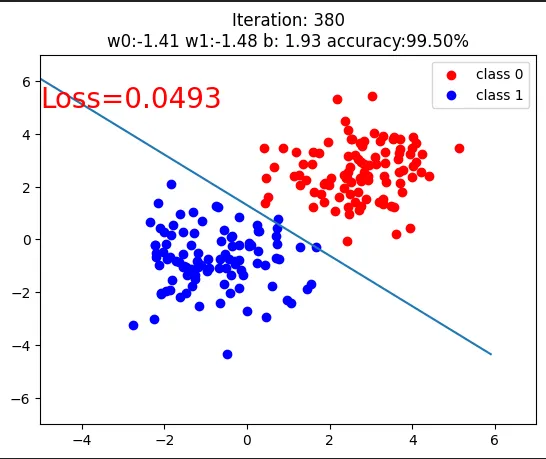

感谢博主的笔记,对我的帮助很大,捋清了我不太明白的知识点